
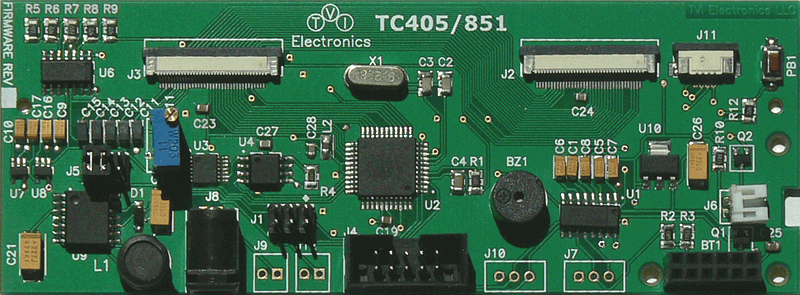
TC405/851 Development Board for Kyocera Display (Optrex) F-51405 & F-51851 Series 240x64 LCDs
 Click
picture to enlarge
Click
picture to enlarge
TC405/851 240x64 LCD Controller Description
The TC405/851 is an intelligent 240x64 LCD controller with integrated touch screen control that provides the Graphical User Interface (GUI) for connecting Kyocera Display (former Optrex) F-51405 and F-51851 Series 240x64 COG Monochrome STN Graphic LCD displays with the target development board. This controller allows user to individually control each display pixel. This independent pixel control allows displaying both text and pictures simultaneously. The TC405/851 uses an ATMEGA32 microcontroller and a 4M bit AT45DB041B Flash. The controller can be used as a development board and reprogrammed via AVRISP device or OEM. This board requires a single regulated 5 VDC supply to be plugged into J12 connector (bypass voltage regulator) or 7-20 VDC power supply to be plugged into J8 or J9 (optional) connectors.
Key Features
-
Supports Kyocera Display F-51405 240x64 LCD displays
-
Supports Kyocera Display F-51851 Series 240x64 LCD displays
-
RS-232 communication interface PC and TTL (8051 Family, AVR, ARM, Basic Stamp, PIC, STM)
-
Optional Bluetooth communication interface
-
Nine programmable baud rates
-
4Mb Flash Memory
-
AVRISP Interface
-
Draw/Clear Line/Rectangle/Circle
-
Animation
-
5 VDC voltage regulator
-
Software controls LCD contrast, backlight ON/OFF, display ON/OFF
-
Hardware contrast adjustment
-
Buzzer
-
Multiple display modes: Normal, Reverse, Mixed
-
4 integrated fonts (custom fonts are available) can be mixed freely on the screen: 7 pixels (H), 14 pixels (H), 14 pixels (H) Bold, 22 pixels (H) (custom fonts are available)


TouchScreen Controller
The TouchScreen controller can respond by sending XY coordinates of touch screen contact location or by sending digits (if used as a 6x3 keypad) to main microprocessor or computer. The TC405/851 LCD controller has a built-in buzzer which can produce a sound on touch. In 6x3 Keypad Mode, the screen is divided on 18 boxes 37x18 pixels each. Each box response can be disabled or enabled. Touch screen controller if used in 6x3 Keypad Mode provides a Flip option which reverses colors of the touched box.


Key Benefits
-
Can be used as a development board or OEM
-
The firmware can be customized for particular application
-
The hardware can be modified for specific OEM requirements
-
VIs and programming examples for LabVIEW are available

TC405/851 LCD Controller Supporting Documentation:
Evaluation Tools
 |
Control Panel CP240x64 V1.3.0 (03/17/20 - 2.27M) |
|
Technical Documentation
 |
User Manual (05/29/12 - 1.08M) |
|
|
Dimensions (05/20/10 - 102K) |
Firmware Release Information
|
Version |
Release Notes |
Release Date |
|
|
|
1.3 |
 |
November 20, 2015 |
User Guides
|
|
Control Panel 240x64 User Guide (November 2015 - 785K) |
This guide describes how to use the CP240x64 software.
|
|
|
Handling Precautions (January 2013 - 53.9K) |
|
|
|
Warranty (January 2013 - 83.5K) |
|
Note: VIs and programming examples for LabVIEW are available on the supporting CD-ROM.


 Print this
page |
Print this
page |
 Tell us what you think! Send
us your comments
Tell us what you think! Send
us your comments
Copyright ©
2025
TVI Electronics, LLC. |
Privacy Statement
| Site Map |

Last modified:
11/17/2025